

Игра «Тетрис» на Ардуино Уно с OLED экраном 128×64 i2c и кнопками — простой, но и интересный проект для начинающих. Схема сборки игры «Тетрис» на Arduino Uno с экраном максимально упрощена, так что любой начинающий сможет ее повторить. Мы включили сюда схему подключения экрана к микроконтроллеру Arduino, а также программу для создания игры «Тетрис» на OLED дисплее SSD1306 128×64.
Для этого проекта потребуется:
- Arduino Uno / Arduino Nano / Arduino Mega
- дисплей OLED SSD1306 i2c
- тактовые кнопки
- пьезодинамик
- макетная плата
- провода «папа-мама», «папа-папа»
- библиотеки Adafruit_SSD1306.h и Adafruit_GFX.h
Игра «Тетрис» на Ардуино с OLED i2c дисплеем
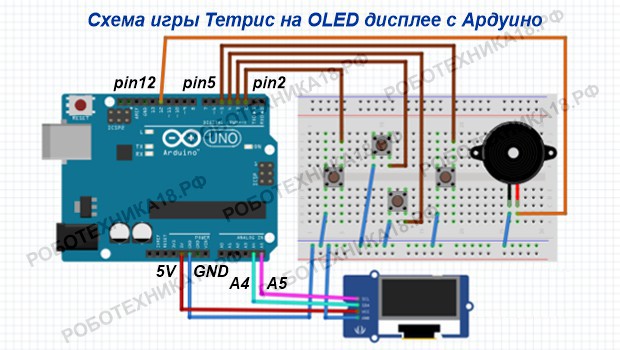
| OLED i2c 0,96 | Arduino Uno | Arduino Nano | Arduino Mega |
| GND | GND | GND | GND |
| VDD | 5V | 5V | 5V |
| SDA | A4 | A4 | 20 |
| SCL | A5 | A5 | 21 |
Экран OLED SSD1306 подключается к плате Arduino Uno по протоколу i2c (см. таблицу подключения дисплея к Arduino Mega). Кнопки подключены к цифровым выводам платы, при необходимости пины могут быть изменены в скетче. Порты для подключения кнопок сконфигурированы в режиме input_pullup, поэтому резисторы не требуются. После сборки схемы загрузите код Тетриса в Ардуино Нано.
Скетч для игры Тетрис Ардуино Уно с дисплеем OLED
#include "Wire.h"
#include "Adafruit_GFX.h"
#include "Adafruit_SSD1306.h"

#define WIDTH 64     // ширина экрана в пикселях
#define HEIGHT 128 // высота экрана в пикселях
#define BUZZER 12   // пин подключения зуммера
#define left 2         // пины подключения кнопок
#define right 5
#define change 3
#define down 4

Adafruit_SSD1306 display(HEIGHT, WIDTH, &Wire, -1);

const char pieces_S_l[2][2][4] = {{ {0, 0, 1, 1}, {0, 1, 1, 2} },
                                  { {0, 1, 1, 2}, {1, 1, 0, 0} }
                                 };
const char pieces_S_r[2][2][4] = {{ {1, 1, 0, 0}, {0, 1, 1, 2} },
                                  { {0, 1, 1, 2}, {0, 0, 1, 1} }
                                 };
const char pieces_L_l[4][2][4] = {{ {0, 0, 0, 1}, {0, 1, 2, 2} },
                                  { {0, 1, 2, 2}, {1, 1, 1, 0} },
                                  { {0, 1, 1, 1}, {0, 0, 1, 2} },
                                  { {0, 0, 1, 2}, {1, 0, 0, 0} }
                                 };
const char pieces_Sq[1][2][4] = {{ {0, 1, 0, 1}, {0, 0, 1, 1} }
                                };
const char pieces_T[4][2][4] = {{ {0, 0, 1, 0}, {0, 1, 1, 2} },
                                { {0, 1, 1, 2}, {1, 0, 1, 1} },
                                { {1, 0, 1, 1}, {0, 1, 1, 2} },
                                { {0, 1, 1, 2}, {0, 0, 1, 0} }
                               };
const char pieces_l[2][2][4] = {{ {0, 1, 2, 3}, {0, 0, 0, 0} },
                                { {0, 0, 0, 0}, {0, 1, 2, 3} }
                               };

const short MARGIN_TOP = 19;
const short MARGIN_LEFT = 3;
const short SIZE = 5;
const short TYPES = 6;
const int MELODY_LENGTH = 10;
const int MELODY_NOTES[MELODY_LENGTH] = {262, 294, 330, 262};
const int MELODY_DURATIONS[MELODY_LENGTH] = {500, 500, 500, 500};

int click[] = { 1047 };
int click_duration[] = { 100 };
int erase[] = { 2093 };
int erase_duration[] = { 100 };
word currentType, nextType, rotation;
short pieceX, pieceY;
short piece[2][4];
int interval = 20, score;
long timer, delayer;
boolean grid[10][18];
boolean b1, b2, b3;

void checkLines() {
  boolean full;
  for (short y = 17; y >= 0; y--) {
    full = true;
    for (short x = 0; x < 10; x++) {
      full = full && grid[x][y];
    }
    if (full) { breakLine(y); y++; }
  }
}
void breakLine(short line) {
  tone(BUZZER, erase[0], 1000 / erase_duration[0]);
  delay(100);
  noTone(BUZZER);
  for (short y = line; y >= 0; y--) {
    for (short x = 0; x < 10; x++) {
      grid[x][y] = grid[x][y - 1];
    }
  }
  for (short x = 0; x < 10; x++) {
    grid[x][0] = 0;
  }
  display.invertDisplay(true);
  delay(50);
  display.invertDisplay(false);
  score += 10;
}
void refresh() {
  display.clearDisplay();
  drawLayout();
  drawGrid();
  drawPiece(currentType, 0, pieceX, pieceY);
  display.display();
}
void drawGrid() {
  for (short x = 0; x < 10; x++)
    for (short y = 0; y < 18; y++)
      if (grid[x][y])
        display.fillRect(MARGIN_LEFT + (SIZE + 1)*x, MARGIN_TOP + (SIZE + 1)*y, SIZE, SIZE, WHITE);
}
boolean nextHorizontalCollision(short piece[2][4], int amount) {
  for (short i = 0; i < 4; i++) {
    short newX = pieceX + piece[0][i] + amount;
    if (newX > 9 || newX < 0 || grid[newX][pieceY + piece[1][i]])
      return true;
  }
  return false;
}
boolean nextCollision() {
  for (short i = 0; i < 4; i++) {
    short y = pieceY + piece[1][i] + 1;
    short x = pieceX + piece[0][i];
    if (y > 17 || grid[x][y])
      return true;
  }
  return false;
}
void generate() {
  currentType = nextType;
  nextType = random(TYPES);
  if (currentType != 5)
    pieceX = random(9);
  else
    pieceX = random(7);
  pieceY = 0;
  rotation = 0;
  copyPiece(piece, currentType, rotation);
}
void drawPiece(short type, short rotation, short x, short y) {
  for (short i = 0; i < 4; i++)
    display.fillRect(MARGIN_LEFT + (SIZE + 1) * (x + piece[0][i]), MARGIN_TOP + (SIZE + 1) * (y + piece[1][i]), SIZE, SIZE, WHITE);
}
void drawNextPiece() {
  short nPiece[2][4];
  copyPiece(nPiece, nextType, 0);
  for (short i = 0; i < 4; i++)
    display.fillRect(50 + 3 * nPiece[0][i], 4 + 3 * nPiece[1][i], 2, 2, WHITE);
}
void copyPiece(short piece[2][4], short type, short rotation) {
  switch (type) {
    case 0: //L_l
      for (short i = 0; i < 4; i++) {
        piece[0][i] = pieces_L_l[rotation][0][i];
        piece[1][i] = pieces_L_l[rotation][1][i];
      }
      break;
    case 1: //S_l
      for (short i = 0; i < 4; i++) {
        piece[0][i] = pieces_S_l[rotation][0][i];
        piece[1][i] = pieces_S_l[rotation][1][i];
      }
      break;
    case 2: //S_r
      for (short i = 0; i < 4; i++) {
        piece[0][i] = pieces_S_r[rotation][0][i];
        piece[1][i] = pieces_S_r[rotation][1][i];
      }
      break;
    case 3: //Sq
      for (short i = 0; i < 4; i++) {
        piece[0][i] = pieces_Sq[0][0][i];
        piece[1][i] = pieces_Sq[0][1][i];
      }
      break;
    case 4: //T
      for (short i = 0; i < 4; i++) {
        piece[0][i] = pieces_T[rotation][0][i];
        piece[1][i] = pieces_T[rotation][1][i];
      }
      break;
    case 5: //l
      for (short i = 0; i < 4; i++) {
        piece[0][i] = pieces_l[rotation][0][i];
        piece[1][i] = pieces_l[rotation][1][i];
      }
      break;
  }
}
short getMaxRotation(short type) {
  if (type == 1 || type == 2 || type == 5)
    return 2;
  else if (type == 0 || type == 4)
    return 4;
  else if (type == 3)
    return 1;
  else
    return 0;
}
boolean canRotate(short rotation) {
  short piece[2][4];
  copyPiece(piece, currentType, rotation);
  return !nextHorizontalCollision(piece, 0);
}
void drawLayout() {
  display.drawLine(0, 15, WIDTH, 15, WHITE);
  display.drawRect(0, 0, WIDTH, HEIGHT, WHITE);
  drawNextPiece();
  char text[6];
  itoa(score, text, 10);
  drawText(text, getNumberLength(score), 7, 4);
}
short getNumberLength(int n) {
  short counter = 1;
  while (n >= 10) {
    n /= 10;
    counter++;
  }
  return counter;
}
void drawText(char text[], short length, int x, int y) {
  display.setTextSize(1);
  display.setTextColor(WHITE);
  display.setCursor(x, y);
  display.cp437(true);
  for (short i = 0; i < length; i++)
    display.write(text[i]);
}

void setup() {
  pinMode(left, INPUT_PULLUP);
  pinMode(right, INPUT_PULLUP);
  pinMode(change, INPUT_PULLUP);
  pinMode(down, INPUT_PULLUP);
  pinMode(BUZZER, OUTPUT);

  display.begin(SSD1306_SWITCHCAPVCC, 0x3C);
  display.setRotation(1);

  display.clearDisplay();
  display.setTextColor(SSD1306_WHITE);
  display.setCursor(18, 40);
  display.println("TETRIS");
  display.setCursor(15, 60);
  display.println("ARDUINO");
  display.display();
  while (true) {
    if (!digitalRead(change)) { if (b3) { break; }
    b3 = false;
    } else { b3 = true; }
  }
  display.clearDisplay();
  drawLayout();
  display.display();
  randomSeed(analogRead(0));
  nextType = random(TYPES);
  generate();
  timer = millis();
}

void loop() {
  if (millis() - timer > interval) {
    checkLines();
    refresh();
    if (nextCollision()) {
      for (short i = 0; i < 4; i++)
        grid[pieceX + piece[0][i]][pieceY + piece[1][i]] = 1;
      generate();
    } else
      pieceY++;
    timer = millis();
  }

  if (!digitalRead(left)) {
    tone(BUZZER, click[0], 1000 / click_duration[0]);
    delay(100);
    noTone(BUZZER);
    if (b1) {
      if (!nextHorizontalCollision(piece, -1)) {
        pieceX--;
        refresh();
      }
      b1 = false;
    }
  } else {
    b1 = true;
  }

  if (!digitalRead(right)) {
    tone(BUZZER, click[0], 1000 / click_duration[0]);
    delay(100);
    noTone(BUZZER);
    if (b2) {
      if (!nextHorizontalCollision(piece, 1)) {
        pieceX++;
        refresh();
      }
      b2 = false;
    }
  } else {
    b2 = true;
  }

  if (!digitalRead(down)) {
    interval = 20;
  } else {
    interval = 400;
  }

  if (!digitalRead(change)) {
    tone(BUZZER, click[0], 1000 / click_duration[0]);
    delay(100);
    noTone(BUZZER);
    if (b3) {
      if (rotation == getMaxRotation(currentType) - 1 && canRotate(0)) {
        rotation = 0;
      } else if (canRotate(rotation + 1)) {
        rotation++;
      }
      copyPiece(piece, currentType, rotation);
      refresh();
      b3 = false;
      delayer = millis();
    }
  } else if (millis() - delayer > 50) {
    b3 = true;
  }
}
Пояснения к коду:
- порты подключения кнопок и зуммера задаются с помощью директивы #define;
- после загрузки программы для запуска игры на OLED SSD1306 необходимо нажать верхнюю кнопку (change).
Заключение. Цель игры — разместить падающие блоки различной формы таким образом, чтобы после каждого хода получалась сплошная линия. Когда линия полностью заполняется, она исчезает, а игрок получает очки. Цель игры — набрать как можно больше очков до того, как вся линия будет заполнена. Если у вас остались вопросы по проекту Тетрис Ардуино Нано, оставляйте их в комментариях.









Счема получается не правильная.Верхняя и нижняя кнопки получаются все время замкнутые.
Вы пробовали собирать, как показано на схеме? Или просто так сделали такое заключение?
Собрал. не работает. так как нарисованно. Не зря же левая и правая кнопка на разрыве ставится.
Кажется я понял. Поверните кнопки на 90 градусов. Ножки кнопок должны быть снизу и сверху, а не по бокам. Тогда они не будут замыкаться. Это же надо еще додуматься, чтобы так их разместить!!!
Скажите, пожалуйста, а как подсоединить верхнюю и нижнюю кнопку к проводам если кнопка и так занимает целую линию и для провода не остаётся места???
Возьмите маленькие кнопки для тетриса или подключите их так же, как левая и правая кнопка
а куда подключать кнопки в ардуино нано?
К тем же самым портам, как на Ардуино Уно
возможно ли сделать так только с тремя кнопками?
сделайте проигрыш
я бы хотел спросить,в вашем коде все верно,но у меня не работает экран,точнее на нем нет игры,также в начале нету подключения к портам A4 и A5,которые подключены именно к экрану.макет делал с ардуино нано